
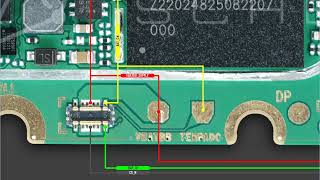
If your Infinix Hot 12 Play X6816 is not charging, suddenly dead, or showing no power, the most common reason is a battery connector problem.
In this post, you’ll learn the exact cause, diagnosis, and 100% working solution used by professional mobile repair technicians.
🔴 Common Infinix Hot 12 Play Battery Connector Problems
Many users report these issues:
- Infinix Hot 12 Play not charging
- Phone dead even with new battery
- Charging icon not showing
- Battery percentage stuck
- Phone turns on only with charger
- Power key working but phone not starting
👉 In 90% of cases, the fault is a loose, damaged, or dirty battery connector on the motherboard.
🔍 Why Battery Connector Fails in Infinix Hot 12 Play X6816
The battery connector may stop working due to:
- Phone dropped or water damaged
- Frequent battery removal
- Dust or corrosion on connector pins
- Overheating during charging
- Low-quality charger usage
These issues break the battery power path, causing charging and dead problems.
✅ Infinix Hot 12 Play X6816 Battery Connector Solution (Step-by-Step)
✔ Step 1: Visual Inspection
Open the phone carefully and inspect the battery connector pins using a magnifying glass.
✔ Step 2: Clean the Connector
Clean the connector using:
- Isopropyl alcohol
- Soft brush or cotton
This removes oxidation and dust.
✔ Step 3: Battery Connector Testing
Use a multimeter to check:
- Battery voltage
- Connector continuity
- Power line connection to PMIC
✔ Step 4: Connector Replacement (If Needed)
If pins are broken or loose:
- Replace the battery connector
- Ensure proper soldering
- Recheck voltage after replacement
✔ Step 5: Jumper Method (Advanced)
If connector pads are damaged:
- Apply jumper wire from battery positive to power line
- Insulate properly to avoid short circuit
⚠️ This step should be done by experienced technicians only.
🔧 Tools Required for Repair
- Multimeter
- Hot air gun
- Flux & solder wire
- Isopropyl alcohol
- Fine tweezers
📌 When to Replace Battery Instead of Connector?
Replace the battery if:
- Voltage drops instantly
- Battery overheats
- Swollen battery
- Phone works only with charger
Otherwise, connector repair is enough.
💡 Professional Tips (Boost Phone Life)
- Always use original charger
- Avoid charging overnight
- Keep phone away from moisture
- Do not force battery connector