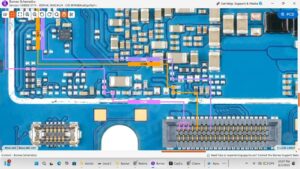
Is your Redmi A5 power button or volume keys not responding? Tried pressing them but nothing happens at all?
In this video, I'll show you the complete Redmi A5 power button and volume keys hardware solution — including jumper points, IC repair, and pad restoration using professional mobile repairing techniques.
📱 Compatible Models:
Redmi A5 (2025)
Redmi A4 / A3 (similar board layout)
Related Xiaomi entry-level models
✔ Problems Solved:
✔ Redmi A5 power button not working
✔ Volume up / volume down keys dead
✔ Phone not turning on with power key
✔ Side buttons no response after drop
✔ Power button pad damaged or lifted
✔ Jumper solution for broken button tracks
🔧 Tools & Parts Used:
Soldering iron / hot air rework station
Redmi A5 schematic & PCB layout
Jumper wire (30–32 AWG)
Multimeter (continuity mode)
Flux paste & solder wire
PCB cleaner / IPA solution
Microscope or magnifying glass
🔔 Subscribe for daily mobile repairing solutions:
👉 [ SUBSCRIBE BUTTON ] — Never miss a repair video!
🔍 Related Searches:
Redmi A5 power button jumper solution
Redmi A5 volume key not working fix
Xiaomi Redmi A5 hardware repair
Redmi A5 PCB diagram
Redmi A5 side button solution
mobile repairing power button solution
Redmi A5 not turning on solution
#RedmiA5 #RedmiA5Repair #PowerButtonSolution #VolumeKeysFix #MobileRepairing #XiaomiRepair #RedmiA5Fix #HardwareSolution #JumperSolution #MobileRepairTips #RedmiRepair #SmartphoneRepair #PCBRepair #RedmiA5Hardware #MobileTechnician