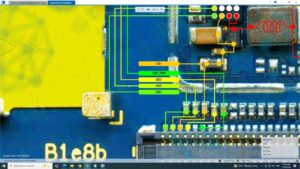
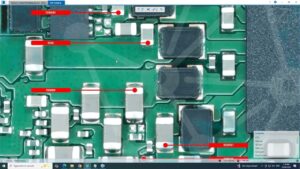
#TecnoPop5LTE #PowerKeySolution #VolumeButtonFix #TecnoBD4 #MobileRepair #HardwareSolution #SanyoMobile
Is your Tecno Pop 5 LTE power button or volume key not working? This professional hardware repair guide shows you the exact on-off key ways and jumper solutions.
In this video, we troubleshoot the Tecno Pop 5 LTE (BD4) power and volume button flex cable and motherboard tracks. Designed for professional technicians in the USA, UK, Canada, and Australia, this tutorial covers safe disassembly, continuity testing, and precision jumpering to restore full button functionality.
Technical Repair Highlights:
Tecno Pop 5 LTE power key jumper ways and track identification
Volume up/down button circuit troubleshooting
Testing motherboard power points and ground lines
Professional flex cable replacement and cleaning tips
Global Technician Resources:
This guide is optimized for mobile hardware experts in Germany, UAE, and worldwide seeking reliable Tecno repair solutions. Learn how to fix unresponsive buttons professionally without damaging the motherboard or internal components.
tecno pop 5 lte power key solution, tecno pop 5 lte volume button fix, tecno pop 5 lte on off key ways, tecno bd4 power button jumper, tecno pop 5 lte volume key ways, tecno pop 5 lte power button not working, mobile hardware repair, tecno pop 5 lte restart problem, how to fix tecno power button, tecno pop 5 lte boot loop fix, smartphone button repair, tecno motherboard jumper solution.