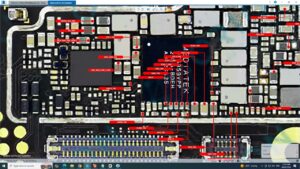
Is your Tecno Pova 4 power button not responding or volume keys completely dead? Did your phone stop turning on or adjusting volume after a drop or water damage?
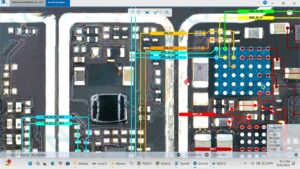
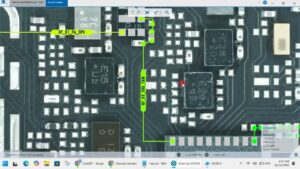
This video shows the complete Tecno Pova 4 power button and volume keys solution, including pad repair, jumper ways, and IC-level motherboard fix. Every step is covered clearly so you can restore all hardware buttons permanently.
📱 Compatible Models:
Tecno Pova 4, Pova 4 Pro, Pova Neo 2, Pova 3
✔ Power button not working after drop or damage
✔ Volume up or volume down key not responding
✔ Phone not turning on due to power button pad damage
✔ Broken or shorted button ways on motherboard
✔ Hardware key jumper solution after pad lift
🔧 Jumper wire / bodge wire
🔧 Soldering iron & hot air station
🔧 DC power supply & multimeter
🔧 Button switch / SMD tactile switch (replacement)
🔔 Subscribe to SANYO MOBILE for daily mobile repair solutions!
🔍 Related Searches:
Tecno Pova 4 power button solution
Tecno Pova 4 volume key jumper ways
Tecno Pova 4 power button pad repair
Tecno Pova 4 volume button not working fix
Tecno Pova 4 hardware button solution
Tecno Pova 4 power key ways motherboard
Tecno Pova 4 volume up down button repair
Tecno Pova 4 button jumper solution
#TecnoPova4 #PowerButtonSolution #VolumeKeySolution #TecnoPova4Repair #ButtonJumperWays #MobileRepair #TecnoRepair #HardwareButtonFix #MotherboardRepair #PhoneRepair #PowerKeySolution #TecnoPova4Pro #VolumeButtonRepair #MobileSolution #SanyoMobile
Tecno • Power Solution