#InfinixSmart7 #TouchScreenProblem #TouchNotWorking #InfinixRepair #MobileHardware #DisplayFix #SanyoMobile
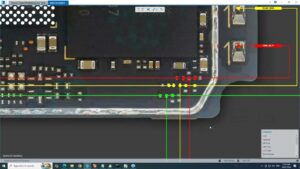
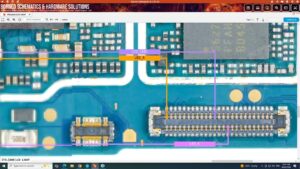
Is your Infinix Smart 7 touch screen not working or responding? This professional hardware tutorial provides a complete Infinix Smart 7 touch screen problem solution and motherboard jumper guide.
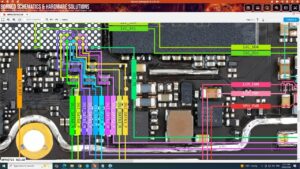
In this video, we diagnose the Infinix Smart 7 (X6515) touch section to fix unresponsive areas, ghost touching, and total touch failure. Designed for professional technicians in the USA, UK, Canada, and Australia, this guide covers step-by-step motherboard-level troubleshooting, including touch connector pinout testing, 1.8V and 2.8V power line checks, and data line jumpering. Whether you are dealing with a software glitch or a physical hardware fault, these monetization-safe repair standards will help you restore full touch functionality.
Technical Repair Highlights:
Infinix Smart 7 touch connector pinout and voltage requirements
How to fix touch not working after screen replacement
Infinix X6515 touch IC jumper ways and path identification
Testing I2C data lines (SDA/SCL) and reset lines
Global Technician Resources:
This guide is optimized for mobile hardware experts in Germany, UAE, and worldwide seeking high-quality Infinix repair solutions. Follow these professional diagnostics to fix Infinix Smart 7 touch problems efficiently and avoid unnecessary parts replacement
infinix smart 7 touch screen problem, infinix smart 7 touch not working solution, infinix smart 7 touch jumper ways, infinix x6515 touch fix, infinix smart 7 ghost touch problem, infinix smart 7 display touch ways, mobile hardware repair, infinix touch ic solution, how to fix infinix touch problem, infinix smart 7 touch section repair, smartphone touch repair, infinix motherboard repair.