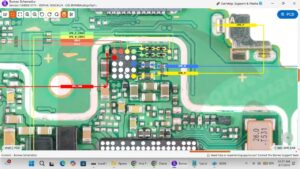
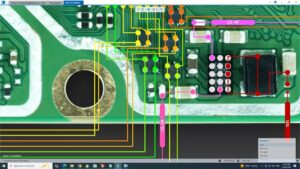
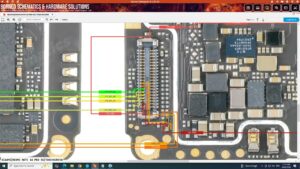
Is your Realme Note 60x power button or volume keys completely unresponsive?
Did your Realme Note 60x side buttons suddenly stop working after a drop or water damage?
This video provides the complete Realme Note 60x power button and volume keys solution with full motherboard-level diagnosis and IC-level repair. If your Realme Note 60x power key is stuck, not clicking, or volume buttons are dead, this professional step-by-step fix will solve it permanently.
📱 Compatible Models:
Realme Note 60x | Realme Note 60 | Realme C63 | Realme C61
✔ Power button completely dead fix
✔ Volume up / volume down keys not working solution
✔ Power button stuck or not clicking repair
✔ Side key IC fault diagnosis & repair
✔ Power & volume flex cable damage solution
🔧 Hot Air Rework Station
🔧 Power & Volume Button Flex Cable
🔧 Side Key IC / Button IC
🔧 Soldering Iron & Precision Tools
🔔 Subscribe to SANYO MOBILE for daily mobile repair solutions — 100% FREE!
🔍 Related Searches:
Realme Note 60x power button solution
Realme Note 60x volume keys not working fix
Realme Note 60x side button repair
Realme Note 60x power key dead solution
Realme Note 60x button IC repair
Realme Note 60x motherboard level repair
Realme Note 60x volume button fix
Realme Note 60x power flex cable solution
#RealmeNote60x #PowerButtonFix #VolumeKeysFix #RealmeRepair #SideButtonRepair #MobileRepair #RealmeNote60xFix #ButtonICRepair #PowerKeyRepair #RealmeNote60 #FlexCableRepair #MotherboardRepair #VolumeButtonSolution #MobileRepairSolution #SanyoMobile
Realme • Power Solution