#VivoV50Lite #ChargingSolution #VivoRepair #90WFlashCharge #MobileRepairing #HardwareSolution #ChargingDataWays
Is your Vivo V50 Lite 4G not charging or not connecting to your PC? In this professional hardware repair guide, we show you the complete charging and data tracks solution.
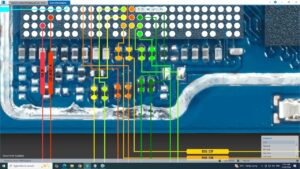
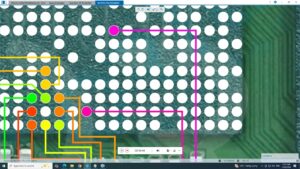
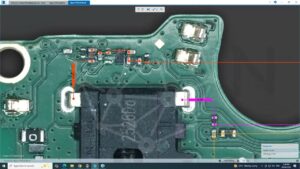
If your device is charging slowly or has no charging indication despite using the original 90W FlashCharge, this video provides the exact Vivo V50 Lite 4G charging jumper ways. We troubleshoot the USB Type-C port, the sub-board flex cable, and the main charging IC data lines. This tutorial is essential for fixing "USB Not Recognized" errors and restoring the super-fast 6500mAh battery charging speed.
Technical Fixes Included:
Vivo V50 Lite 4G Charging Data Pins (D+ and D-) trace identification.
VBus and GND jumper points for charging restoration.
How to identify a faulty 90W charging circuit.
Safe disassembly and cleaning of the Vivo V50 series charging port.
Professional Repair Context: We use digital multimeters to verify voltage and diode mode readings on the charging sub-PCB and main board
vivo v50 lite 4g charging solution, vivo v50 lite 4g charging problem, vivo v50 lite 4g charging ways, vivo v50 lite 4g charging data ways, vivo v50 lite 4g usb not recognized, vivo v50 lite 4g charging jumper, how to fix vivo v50 lite 4g not charging, vivo v50 lite 4g charging ic solution, 90w flashcharge repair, vivo hardware repair 2026